
Reef tank app · Made by Printed Reef
Keep a reef, not a spreadsheet.
Your test kit readings, ICP results and HYDROS probes in one place. TankSensei flags what's out of range, tells you what to do about it, and counts down your salt and supplements as you use them.
Works with what's already on your stand
- Neptune Apex*
- CoralVue HYDROS
- Hanna Checkers
- Test strips
- Refractometers
- Triton ICP
- ATI ICP
- Oceamo ICP
- Tropic Marin ICP
- Reef Labs ICP
- Modern Reef ICP
*Apex needs a Printed Reef display or hub on your home network, coming soon. TankSensei can't connect to an Apex on its own.
Why it exists
A crash usually starts as a small number nobody noticed.
TankSensei watches for the quiet ones.
-
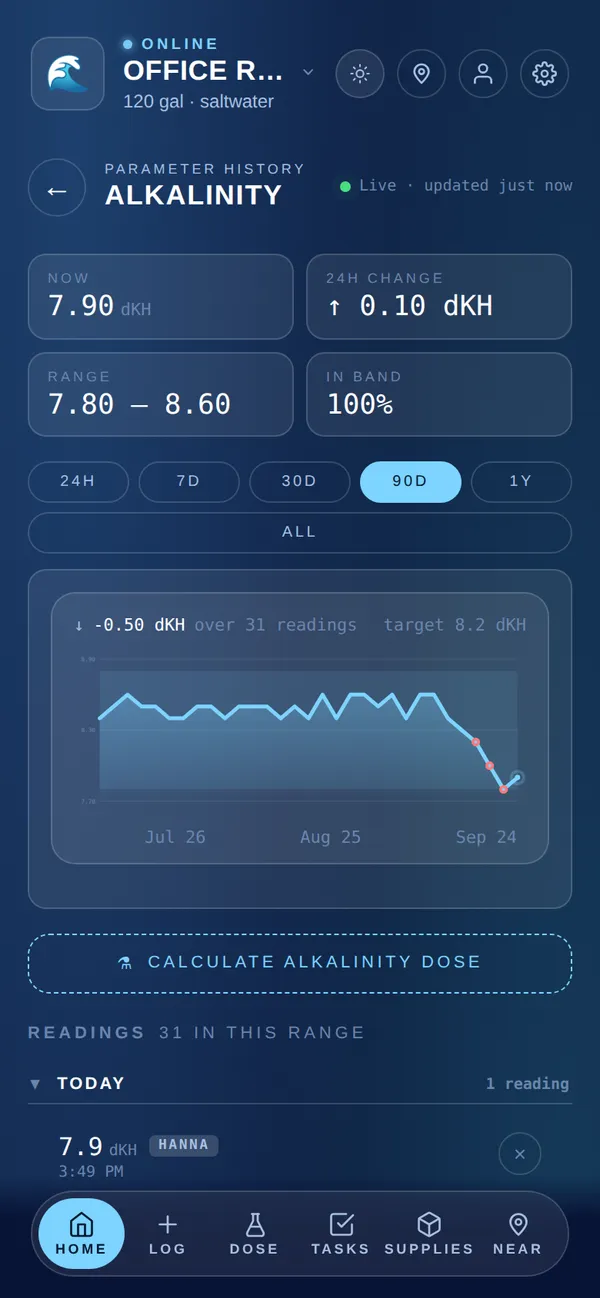
Alk is falling a few tenths a day and nobody's graphing it.
TankSensei: Test on 4 days a week. If a steady slide will take it out of range within 3 days, it shows in your tank summary, and in the morning email if you turn it on.
-
The salt bucket is empty on water-change day.
TankSensei: Log what you have. Water changes and doses count it down, and once it knows your usage, the morning email, if you turn it on, says when you're two weeks from empty.
-
Your ICP shows copper and nobody tells you what to check.
TankSensei: Metals outside range are flagged on your ICP results page.
-
You're away and the sitter doesn't know the routine.
TankSensei: Send your sitter a link with your instructions and a checklist. They tick it off and add a note or photo. No account needed.
Everything the tank needs, in one place.
01
One record for the whole tank
Test kit readings, ICP reports, HYDROS probe history, supplies, livestock and tank photos, kept together so you can see what moved and when.
02
Warns you early, with the fix
Each parameter card shows OK, HIGH or LOW against your tank's targets. When a reading leaves its range you get a push (once you allow notifications), repeated until it's back, and an email when it's far out or push can't reach you. For the main parameters it says what to do about it. Test regularly and it also warns when a steady trend will leave the range within 3 days.
03
Logs the way you actually test
Snap your Hanna Checker, a test strip against its card, or your refractometer. The value is read, you confirm it, and it's saved. ICP reports upload as a PDF, or as CSV or Excel for the labs listed below.
04
Handles the chores around the tank
Counts down salt and supplements, reminds you about water changes and tests, shows RO/DI cartridge changes in Today when they're due, gives your sitter a checklist link, and lets a partner or reef buddy share the tank.
How it works
From new tank to in control, in three steps.
-
Step 01
Tell it about your tank.
Saltwater or freshwater, the style (SPS, mixed, soft and LPS, FOWLR, planted, shrimp), the size and the age. TankSensei tracks its stage, from cycling to established, and keeps dosing locked until the tank is ready.
-
Step 02
Log readings the way you test.
A photo of your Hanna Checker, strip or refractometer, an ICP report, or plain typing. Connect a HYDROS and its temperature, pH, salinity and alkalinity readings log themselves.
-
Step 03
Get one clear next step.
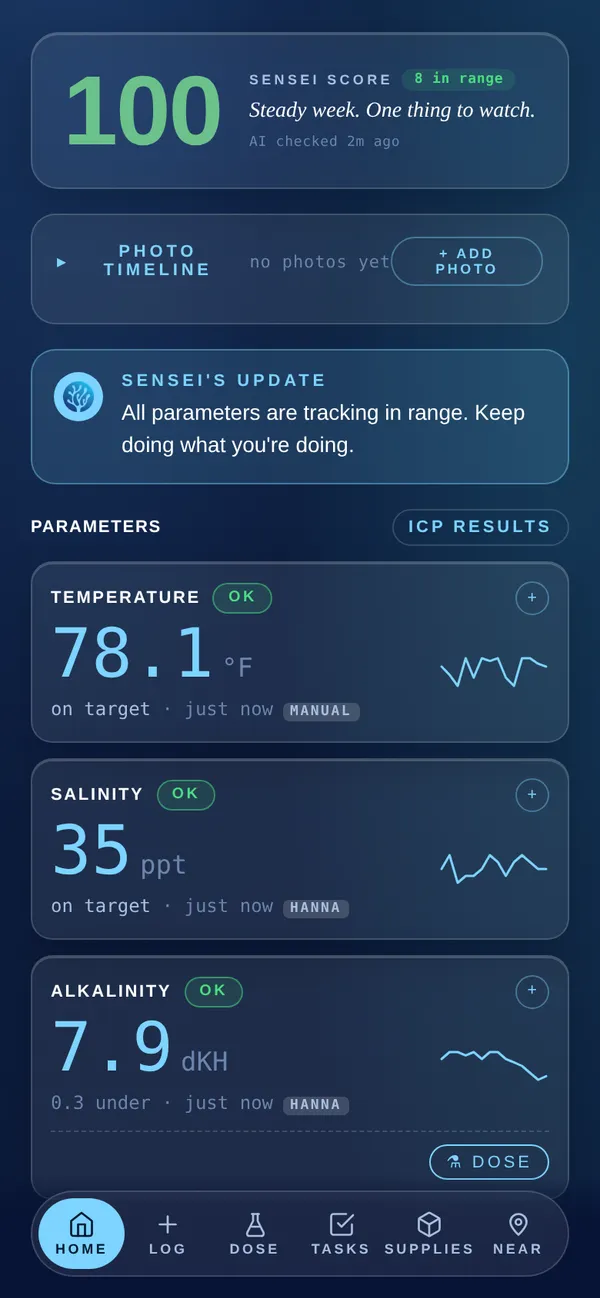
Your Sensei Score (0 to 100) shows how healthy the numbers are. A short written summary says what's going on and what to do next. If a reading leaves its range, you get an alert.
ICP results
Your ICP, finally readable.
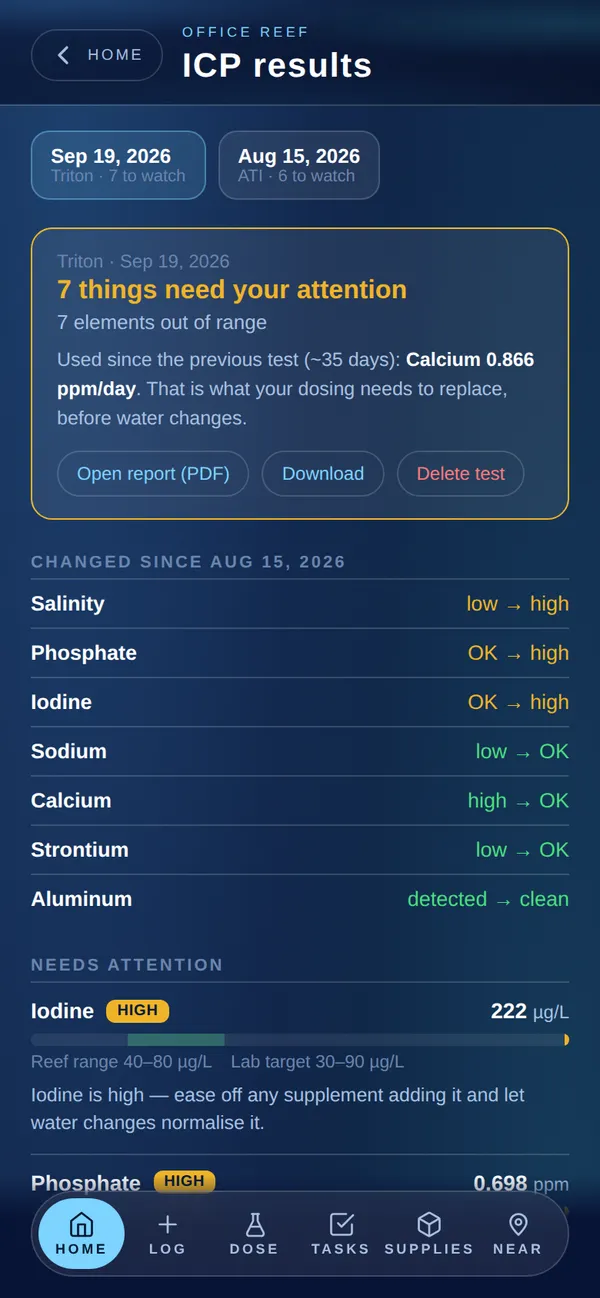
An ICP measures dozens of elements, and the report is a wall of numbers. TankSensei turns it into what's low, what's high, what showed up and what changed since last time.
- Checked against reef ranges. 26 elements have a reef range. The rest are compared with your lab's printed target when the report has one.
- Metals flagged. Metals outside range are flagged on your results page, with what to check first.
- What changed. Compared with your last test. After two tests, see how fast your tank uses alk, calcium and magnesium.
- Feeds your score. The values you pick become readings in your tank log.
- Every test kept. PDF uploads keep the original file beside the results.
- You choose what becomes a reading. Every value is shown first and the full report is saved. Only the ones you tick become readings.
Works with Triton (PDF or CSV), ATI Labfish (PDF, CSV or share link), Oceamo (PDF or CSV), Modern Reef (PDF), Tropic Marin (CSV) and Reef Labs (Excel). Using another lab? Tell us in Feedback and we'll look at adding it.
Coming soon from Printed Reef
Your tank, on your stand.
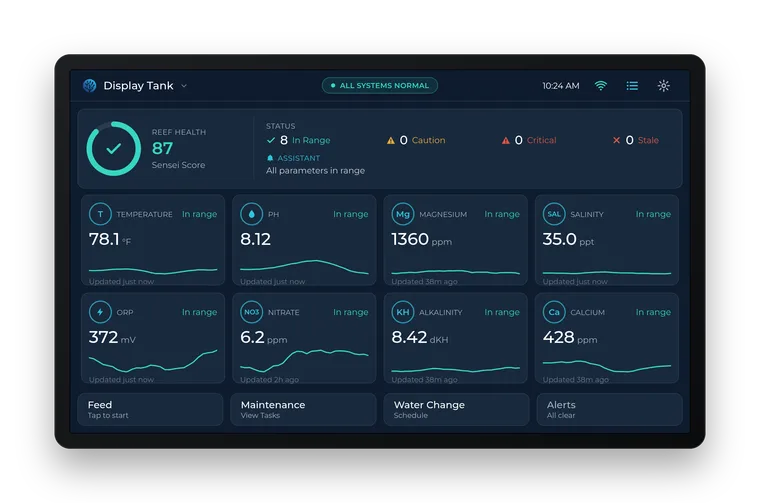
TankSensei isn't only an app. Printed Reef is building displays that sit by the tank and show how it's doing at a glance. On your home network, a display reads your Neptune Apex (its probes, including Trident alkalinity, calcium and magnesium) and sends it to TankSensei. If a display stops reporting, you get an urgent push.
View 7
A 7-inch touch screen. Shows your Apex probes, Trident results and outlets, with your Sensei Score. Works with any Apex.
Trident display
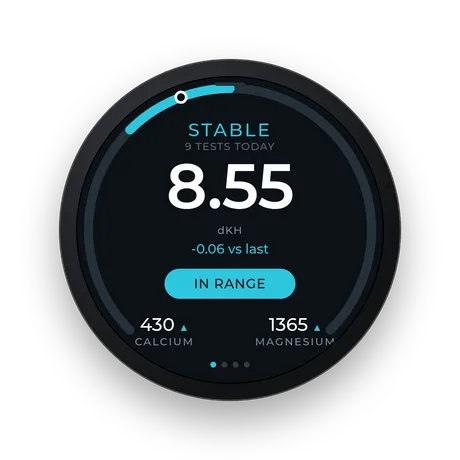
A 1.75-inch round screen that shows your Trident results at a glance. Needs an Apex with a Trident.
Screens shown as mockups of what each display shows today.
Your spreadsheet vs TankSensei
| Task | Your spreadsheet | TankSensei |
|---|---|---|
| Logging a Hanna Checker reading | You type it | Snap a photo, confirm, done |
| ICP results | Retype dozens of elements | Upload the PDF or CSV |
| HYDROS probe history | In a separate app | On the same record |
| Alk heading out of range | Only if you graph it and look | Flagged before it gets there, if you test most days |
| Running out of salt | You find out on water-change day | Forecast ahead of time |
| Going away for the weekend | Leave a note | Send your sitter a checklist link. No account needed. |
| Water-change day | Mix math on a sticky note | A salt-mix guide, and the salt comes off your supply count |
The little things
The details reefers asked for.
- Alerts that repeat until it's fixed. A push when a parameter leaves its range, repeated until it's back, and an email when it's far out. Non-urgent alerts wait until morning.
- A morning email, if you want one. At 9am: what's out of range, what's heading there, and what's running low. Otherwise we email only when something needs you.
- A careful dose calculator. Alk, calcium and magnesium, with nine common products from baking soda to kalkwasser. It won't run without a real reading. It rounds down and stays under daily limits.
- Water-change helper. A salt-mix guide for each water change, and the salt comes off your supply count.
- Tank stages. Setup, cycling, maturing, growing, established. Dosing stays locked until the tank is past cycling.
- A sitter link. Instructions, a contact and a checklist in one link that expires when you say (up to 90 days). No account needed.
- Livestock that fits. 285 saltwater species, each with a fit verdict for your tank. Snap a photo to identify one.
- Equipment. Track your gear. RO/DI cartridge changes show up in Today when they're due.
- Near You. Reef stores, clubs, events and frag swaps near you.
- Share a tank. Invite a partner or reef buddy as a viewer or an editor.
- A weekly alert test. Turn it on and TankSensei sends a test push each week, and emails you if it fails.
- Your data, yours. Export any tank to Excel. Delete your account and your data is removed within 30 days, and from backups within 8 weeks.
Who's behind it
Built by a reef gear company, on our own tanks.
We're the team at Printed Reef, where we design and 3D-print reef gear. Our own tanks are SPS-dominant and run on Apex, Trident and DOS, and every feature in TankSensei started as a frustration on one of them.
We built the tool we wanted: one place for every reading, that speaks up when something drifts and explains why. No data sales. No upsell loop disguised as advice.
We ship updates most weeks, and most of them start as a note from a reefer. You can see every one in What's new.
The Printed Reef team
What's new
Recent updates
Every test on one page, and any dose
Tap All history on Home to see every parameter's chart on one page, in your own units, with how far each sits from target.
Asked for by a reeferOnline reef stores in Near You
Near You now lists online reef stores beside your local ones: tap Online to see where each one ships and what they sell, with a link to their shop.
Quarantine tanks and treatment log
Add a tank as a quarantine or hospital tank: only temperature, ammonia, nitrite and pH are graded there, so hyposalinity is not called low, and it gets ammonia and nitrite cards and no reef chores.
Pricing
Free. No subscription.
Every feature below is free, on as many tanks as you keep. Photo reading and a few other features have a daily fair-use limit.
- As many tanks as you keep
- Photo logging for Hanna Checkers, strips and refractometers
- ICP import: Triton, ATI, Oceamo, Modern Reef, Tropic Marin, Reef Labs
- CoralVue HYDROS connection
- Sensei Score, written summary, push and email alerts
- A 9am email with what's off and what's running low, if you want it
- Supply tracking and a water-change helper
- Dose calculator, livestock catalog, photo timeline
- Sitter link, tank sharing and Near You
- Excel export of any tank
Built and paid for by Printed Reef. No card, no ads, and we never sell your data.
Common questions
Everything reefers ask before signing up.
Do I need a controller to use TankSensei?
No. Hand tests, photo logging, ICP imports, the dose calculator, alerts, supplies and the Sensei Score all work without one. If you run a CoralVue HYDROS, connect it with a key from the HYDROS app and its readings arrive on their own. Neptune Apex needs a Printed Reef display or hub, coming soon.
Is TankSensei an AI app?
Not in the way most apps mean it. You don't need to ask it anything. TankSensei is your tank's record and early-warning system, and most of it runs on fixed rules: the OK, HIGH and LOW labels, the Sensei Score, target ranges, alerts, livestock fit checks and dose amounts. AI does specific jobs behind the scenes: reading test photos and your first tank photo, identifying livestock, comparing tank photos, filling in a product's details from its name or label, reading order emails you forward, answering questions you ask about your tank, and writing your tank summary, per-species advice and a second opinion on doses.
Which ICP labs are supported?
Triton (PDF or CSV), ATI Labfish (PDF, CSV or share link), Oceamo (PDF or CSV), Modern Reef (PDF), Tropic Marin (CSV) and Reef Labs (Excel). You see every value before import and choose which become readings. 26 elements are checked against a reef range, and the rest against your lab's printed target when the report has one. PDF uploads keep the original file with the test. Using another lab? Tell us in Feedback and we'll look at adding it.
How does the Apex connection work?
It needs a Printed Reef display or hub: TankSensei can't connect to an Apex on its own, and the displays aren't on sale yet. The View 7 works with any Apex; the Trident display needs an Apex with a Trident. The display sits on the same network as your Apex, signs in to it with the Apex's local username and password, and reads its probes, including Trident results. There's no Apex Fusion login and no port forwarding. The Printed Reef hub, also coming, does the same job: it collects data from the reef controllers on your home network and sends it to TankSensei. Join the display list to hear when it's ready.
How does the HYDROS connection work?
Create a Read only key in the HYDROS app, then paste it in Account, Connect HYDROS, and pick the tank it belongs to if you have more than one. No CoralVue password is shared. Temperature, pH, salinity and alkalinity are recorded, and a live tile on Home shows your probes. Calcium, magnesium and HYDROS manual inputs aren't read. TankSensei only reads: it never changes a setting on your controller. The step-by-step guide has screenshots. If you connected earlier with your CoralVue email and password, that keeps working for now.
Will TankSensei warn me when something goes wrong?
Yes. When a reading leaves its range you get a push (once you allow notifications) that names the problem and, for the main parameters, what to do. When it is far out of range, or when push cannot reach you, an email comes too. The push repeats about every 6 hours until it's back in range. Non-urgent alerts wait until 8am. If a connected probe source goes quiet for 72 hours, you hear about that too. And if you want it, a 9am email sums up what's off, what's heading out of range and what's running low.
How does the Sensei Score work?
The Sensei Score (0 to 100) is your tank's health: each parameter checked against your tank's targets. After 14 days of readings, a separate Stability rating shows how steady things have been. A short written summary, refreshed every couple of days, explains what's going on and what to do next.
Can TankSensei read my Hanna Checker or test strip?
Yes. On Home, open a parameter card, tap Quick add, and photograph a Hanna Checker display, a strip against its color card, or your refractometer eyepiece. You confirm or adjust the value before it saves. Quick add also converts for you: S.G. to ppt, °C to °F, Hanna alkalinity ppm to dKH, and Hanna phosphorus ppb to phosphate.
Where does my data go?
Your tank data is stored on our servers. It's never sold or used for ads, and we don't use third-party analytics or ad pixels. We do record how the app is used (which screens and features, tied to your account) and crash reports, so we can fix and improve it. When TankSensei uses AI for any of the jobs listed under "Is TankSensei an AI app?", the relevant data goes to Anthropic's API with a hashed user id, not your email. The full list is in our Privacy Policy. You can export any tank to Excel, or delete your account (unlink any Printed Reef display first).
What kinds of tanks does TankSensei support?
Saltwater (SPS-dominant, mixed reef, soft and LPS, FOWLR) and freshwater (high-tech planted, low-tech planted, community, African cichlid, shrimp). Each type has its own parameter targets, scoring and cycling tolerances. You can also rename, hide or add custom parameters per tank. The livestock catalog is saltwater only for now.
Is there an iPhone or Android app?
TankSensei installs from your browser on iPhone, Android and desktop, and works like an app. On iPhone, open tanksensei.com/app in Safari, tap Share, then Add to Home Screen. Push notifications work from the installed app. Native store apps are on the roadmap.
What does it cost?
Nothing. TankSensei is free, with no subscription. It's built and paid for by Printed Reef, the team that makes it. AI features like photo reading have a daily fair-use limit. Printed Reef displays will be sold separately.
Start with your last test.
Type it in or snap a photo of your Hanna Checker. TankSensei takes it from there.
Start your tank, freeFree · No subscription